More and more people have started to adopt AI into their workflows to improve their productive.
One area that is especially interesting for AI adoption is software development as AI strives in environments with defined patterns such as programming languages.
Moreover, the correctness of AI generate code can usually be verified by testing it sufficiently, which can also be handled by AI.
There are various possible workflows for using AI to develop code that include different levels of human involvement into written lines of code.
Here I would like to focus on Agentic AI, which employs harnesses for LLMs that enable the execution of tools such as reading and editing files, running linting tools and tests, and installing dependencies.
Given a goal such as to develop an application according to a specification, such an agentic coding harness can develop the desired application all on its own.
However, when an AI agent encounters resistance such as a test not passing it might try different approaches to resolve the issue but end up taking drastic measures such as deleting a database.
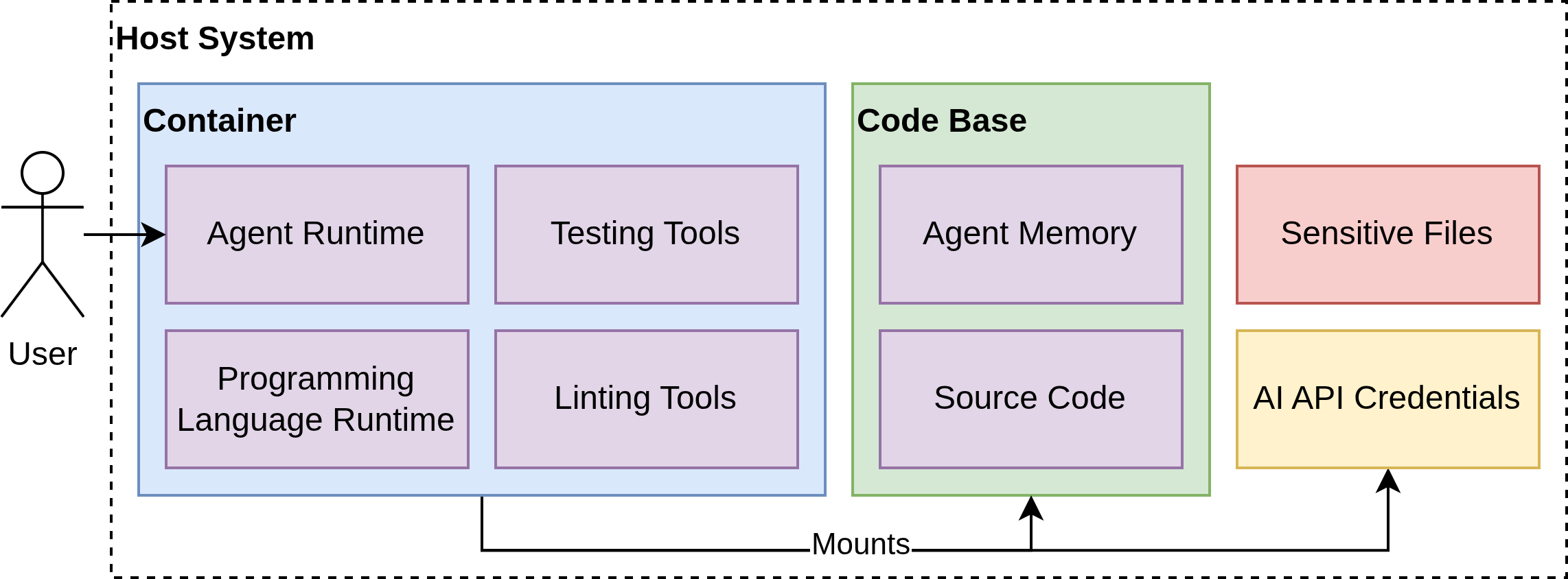
A common safety practice is to isolate coding agents into a sandbox that only contains the files it has to access to complete its task.
One way to implement a sandbox is via containerization, such as Docker or Podman.
In such a setup the container mounts the source code and any config file it needs to have access to but nothing else on a user’s system, preventing it from affecting outside the project.
The agentic coding harness is installed inside the container, along with a runtime of the employed programming language and other tools required for developing in said programming language.
By only letting the coding agent run code inside the container, it cannot accidentally affect files outside the container, for example, if it messed up a file path and ends up writing or deleting from outside the project folder.
I created an implementation of such a framework for isolating two common coding agents, OpenCode and OpenClaude, as Coding Agents.
The code consists of Dockerfiles and shell scripts to set up and start the container environments.
These shell scripts configure mounting and symlinks such that the coding agents store their persistent session files in a folder called .agent-memory in the project folder.
This enables separate sessions and configurations per project.
I introduced the framework and gave an example of how to use it in a workshop, the slides for which can be found here: Slides
Related Posts
About Me

Dr. Jonathan Decker
Jonathan Decker takes the role of a system architect with a focus on designing systems that enable new and novel ways of utilizing Cloud and HPC resources, while also being efficient, secure and scalable.
Most notably, he strives to combine HPC with Kubernetes to get the best of both worlds.
Jonathan completed his PhD in 2025 via his work on Chat AI and its underlying AI inference platform, which now enables secure and sensitive access to AI services for students and researchers across Germany.
Moreover, in 2025, he served as the speaker of the PhD student representatives of the Georg-August-University of Göttingen.
Now he heads a team in the High-Performance Storage research group of Prof Kunkel while being in close collaboration with the GWDG.
There he handles research, supervision of PhD students and university teaching activities.